Showing posts with label Automated Trading. Show all posts

Saturday, May 23, 2020

Python for Finance: Book Review

Python for Finance by Yves Hilpisch is an ambitious, reasonably priced book published by a reputable publishing house on the topic of Algorithmic Trading with Python. I think it provides an excellent starting point and ideas for people trying to get a grip on what it would take to set up an algorithmic trading infrastructure.

The book caters to intermediate and advanced level students, which means you would need at least some coding ability and a decent understanding of financial markets to be able to benefit from this book. Many topics touched upon merit a book on their own, therefore the text is practically brief with the intention of introducing the user to key concepts and further related resources. I especially like the way the author touches upon the theory without getting carried away, keeping the right balance between telling the reader what is happening without theoretical overload, all the while providing working Python examples. Most of the code used in the book can be found in its accompanying website.

Now for a detailed book review/ my advice on how to get the best out of it:
  • If you have experience with Python, you can skim through the first six chapters. Second chapter has some interesting information regarding infrastructure, but it is highly unlikely to be applicable to a single man retail trader army when you are starting up. At certain point you may need to host the development on cloud, for which learning to deploy Jupyter notebook server should suffice. If you are not familiar with Python object model, worth reading the summary in the end of Chapter 6
  • Chapter 7 to 13 digs into many tools and techniques that you may need as a quant. Even if you are an experienced quant, the chapters are still worth a quick read, even if only to get to ideas/validation on efficient Pythonic implementations of some useful mathematical tools. If your algorithms are going to be relatively simple and will not delve into complex derivatives, portfolio management or machine learning, you can more or less skip chapters 11, 12 and 13.
  • Chapter 14 to 16 is where, so to say, the tyre meets the road. For me, this is the highlight of the book as it details how the get tick data and trade using Python in the real world and backtest/ develop your strategy
  • I did not read chapter 17 onwards as I do not plan to do deal with trading and valuation of complex derivatives

Thursday, May 21, 2020

Getting FXCM Working With Python

While I will do a full review on Python for Finance once I am done with the book, enroute I will keep sharing some items I feel may be useful.

In chapter 14 the author demonstrates how a python program can connect to an online broker, FXCM. Just sharing detailed steps on how I got the API token.

1. Sign up for the demo account as suggested by the book. You will receive an email with a password.

2. Sign into your demo account, which for me looked as below:


3. Click the part highlighted in the picture above to bring up a context menu (shown below) and click “Token Management”.


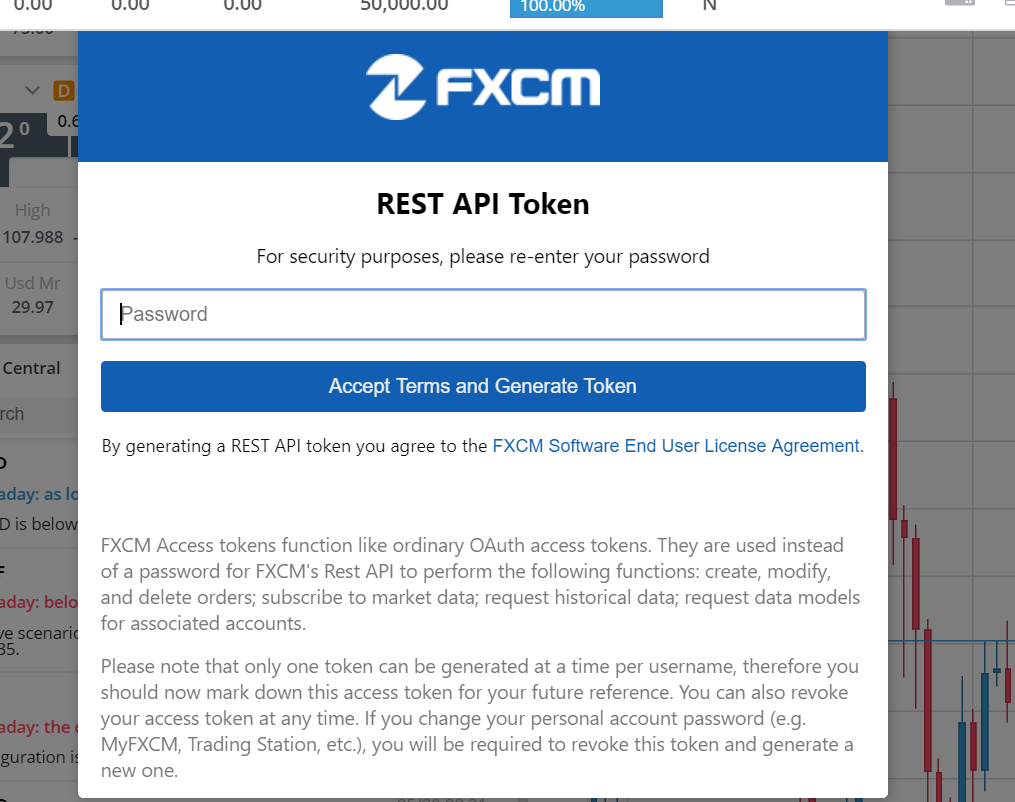
4. You should see a dialog similar to the snapshot below. Enter the password you got on your email to generate the REST API token.


While the book recommends FXCM, I know that Oanda also provides a python wrapper. I won't be using FXCM as at the time of the blog it supported only currencies for algorithmic trading, while I was looking for indices. Only following currency pairs are supported:

('AUDCAD', 'AUDCHF', 'AUDJPY', 'AUDNZD', 'CADCHF', 'EURAUD', 'EURCHF', 'EURGBP', 'EURJPY', 'EURUSD', 'GBPCHF', 'GBPJPY', 'GBPNZD', 'GBPUSD', 'GBPCHF', 'GBPJPY', 'GBPNZD', 'NZDCAD', 'NZDCHF', 'NZDJPY', 'NZDUSD', 'USDCAD', 'USDCHF', 'USDJPY')

For fxcmpy to work, You would need the python-socketio installed.

Also, for In[1] on page 470, I could not get "from pylab import mpl, plt" to work. Changing to "from matplotlib.pylab import mpl, plt" fixed the problem for me.

Friday, November 8, 2019

Chaikin Money Flow in MQL

Dabbling with MQL, here is my take on Chaikin Money Flow, adapted from Forex Indicators. Happy for suggestions/ any pointers if you think this is incorrect.

#property copyright "Copyright 2019, Saveen Kumar"
#property link      "https://www.linkedin.com/in/saveenkumar/"
#property version   "1.00"
#property strict

//indicator properties
#property indicator_separate_window
#property indicator_buffers     1
#property indicator_color1      Magenta
#property indicator_level1      0
#property indicator_levelstyle  STYLE_DOT
#property indicator_levelcolor  Black

//indicator inputs
extern int    CMFPeriod = 20; //period for CMF

//buffers
double CMFLineBuffer[]; //for line, value of actual CMF

//+---------------------------------------------------+
//| Custom indicator initialization function          |
//+---------------------------------------------------+
int OnInit()
  {
   //--- check if  CMF period is acceptable
   if(CMFPeriod<2)
    {
     Print("CMF period needs to be more than 2");
      return(INIT_FAILED);
    }
  
   //set up the buffer
    IndicatorBuffers(indicator_buffers); 
    SetIndexStyle(0, DRAW_LINE); 
    SetIndexBuffer(0, CMFLineBuffer);     
   
    //show labels if wanted
    SetIndexLabel(0, "CMF"); 
    IndicatorShortName("CMF (" + 
              IntegerToString(CMFPeriod) +")");
          
    //begin drawing
    SetIndexDrawBegin(0,CMFPeriod);
   
    return(INIT_SUCCEEDED);
  }
//+-------------------------------------------------+
//| Custom indicator iteration function             |
//+-------------------------------------------------+
int OnCalculate(const int rates_total,
                const int prev_calculated,
                const datetime &time[],
                const double &open[],
                const double &high[],
                const double &low[],
                const double &close[],
                const long &tick_volume[],
                const long &volume[],
                const int &spread[])
  {         
         //need minimum bars
         if(rates_total<=CMFPeriod) return(0);
                       
         //the number of bars to calculate in 
         //this iteration
         int limit=0;
      
         //if bars calculated are less than the
         //CMF period, buffer value up to the
         //period will be zero and we begin our
         //calculation of CMF after these
         //initial zero bars
         if(prev_calculated <= CMFPeriod)
         {
            for(int i=1;i<=CMFPeriod;i++) 
            {
               CMFLineBuffer[rates_total-i]=0.0;
            }
            limit=rates_total-CMFPeriod;        
         }
         //if more than CMF period bars already 
         //calculated, start after them  
         else{
            limit=rates_total-prev_calculated;
         }
        
         //main loop, where we are calculating  
         //only as many bars as are absolutely 
         //necessary        
         for(int i=0;i<=limit;i++)
         {
            double ADSum = 0.0;
            double VolSum = 0.0;
            
            for(int j=0;j0)
                  ADSum += tick_volume[i+j]*
                            (close[i+j]-open[j+i])/
                            (high[i+j]-low[i+j]);  
            }
            CMFLineBuffer[i]= ADSum/VolSum;
         }
         
      return(rates_total);   
     
      
  }

Trading212 ISA: A Brilliant Choice Brilliantly Ignored!

 As far as tax saving schemes are concerned, Stock & Shares ISAs are an amazing value for money for knowledgeable retail investors. £20,...